3D smart-speaker configurator (Three.js)
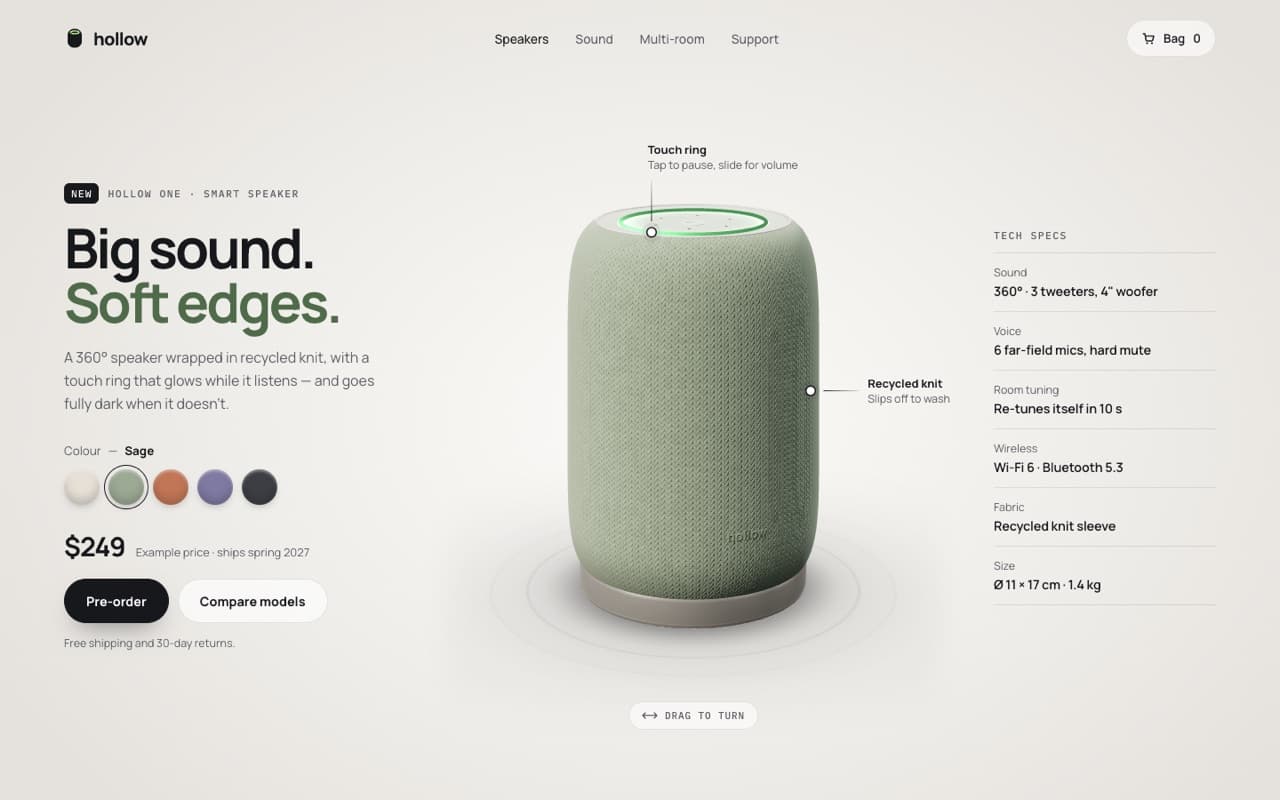
A light, premium product page with a procedural knit-fabric speaker you can turn, a glowing touch ring and colour swatches that dye the fabric from the bottom up.
Live — built from this exact promptOpen live demo
prompt.md
Course onlyBuild a single, self-contained index.html: a light, premium product page for a [PRODUCT, e.g. smart speaker] with a live 3D configurator in the middle. Brand: [BRAND] — product name [PRODUCT NAME], price [PRICE, labelled "Example price"] Headline: [LINE 1, ink] / [LINE 2, in the current colourway's accent] Colourways: [e.g. Chalk, Sage, Clay, Dusk, Graphite — fabric, cap, ring glow and a dark accent for each] Technical rules
The full prompt comes with the course
All 55 prompts in the library are part of the Vibewrights course. Enrollment opens in January 2027 — join the waitlist to get the founding-member price.
See what's includedWhat you'll get
- ✓A procedural knit-fabric shader with bump, heather and a pressed logo
- ✓A studio lighting environment built entirely in code
- ✓Colour swatches with a rising-dye transition
- ✓Turntable + drag to rotate, callouts pinned to the 3D model
How to use it
- 1Replace everything in [BRACKETS] with your own product, copy and colors.
- 2Paste it into Claude Code, Cursor, Lovable or Bolt and open the page in Chrome.
- 3Compare with the live demo, then tune one thing at a time.
— From the course
You'll build this end-to-end in Module 6, with a step-by-step video walkthrough and AI feedback on your project.