Iridescent soap bubbles product page (WebGL)
Thin-film soap bubbles float around a CSS-drawn skincare bottle, stick together with shared walls and pop with a tiny splash when you hover them.
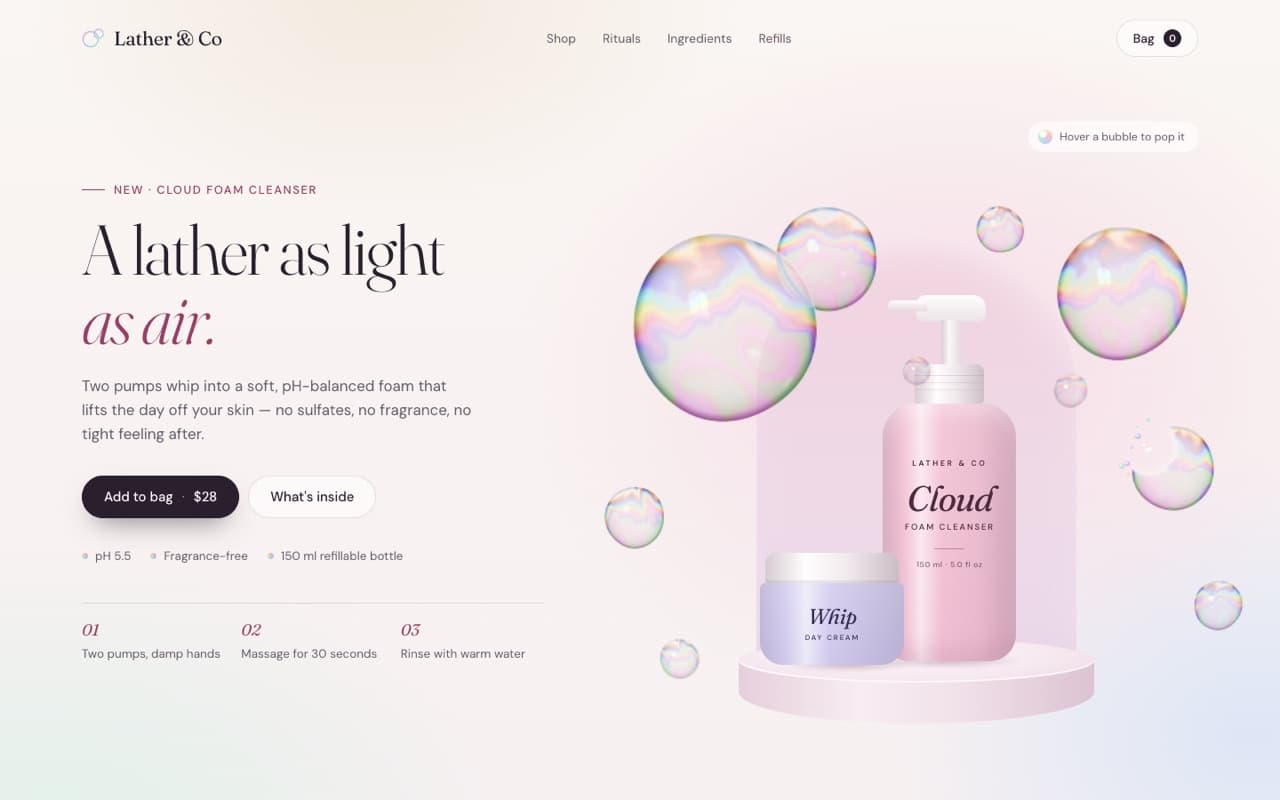
Live — built from this exact promptOpen live demo
prompt.md
Course onlyBuild a single, self-contained index.html: a light, airy product page for a [PRODUCT TYPE, e.g. clean-skincare cleanser] where iridescent soap bubbles float around the product, stick together and pop under the cursor. Brand: [BRAND NAME] — [PRODUCT NAME AND ONE-LINE BENEFIT] Headline: [LINE 1, light serif] / [LINE 2, italic accent] Palette: [e.g. pastel blush #f7dde7, lilac #dde6f6, mint #e2f1ea on warm white; ink #2a1f2d; rose accent #9a3d66] Technical rules
The full prompt comes with the course
All 55 prompts in the library are part of the Vibewrights course. Enrollment opens in January 2027 — join the waitlist to get the founding-member price.
See what's includedWhat you'll get
- ✓Real thin-film interference colours in a fragment shader
- ✓Bubbles that stick together with a shared wall
- ✓Hover-to-pop with a droplet splash on a 2D canvas
- ✓A product bottle and jar drawn entirely in CSS
How to use it
- 1Replace everything in [BRACKETS] with your own product, copy and colors.
- 2Paste it into Claude Code, Cursor, Lovable or Bolt and open the page in Chrome.
- 3Compare with the live demo, then tune one thing at a time.
— From the course
You'll build this end-to-end in Module 3, with a step-by-step video walkthrough and AI feedback on your project.