Bento grid features section with live visuals
Six feature tiles in a bento layout — a self-drawing chart, growing budget bars, pulsing security and a rotating orbit.
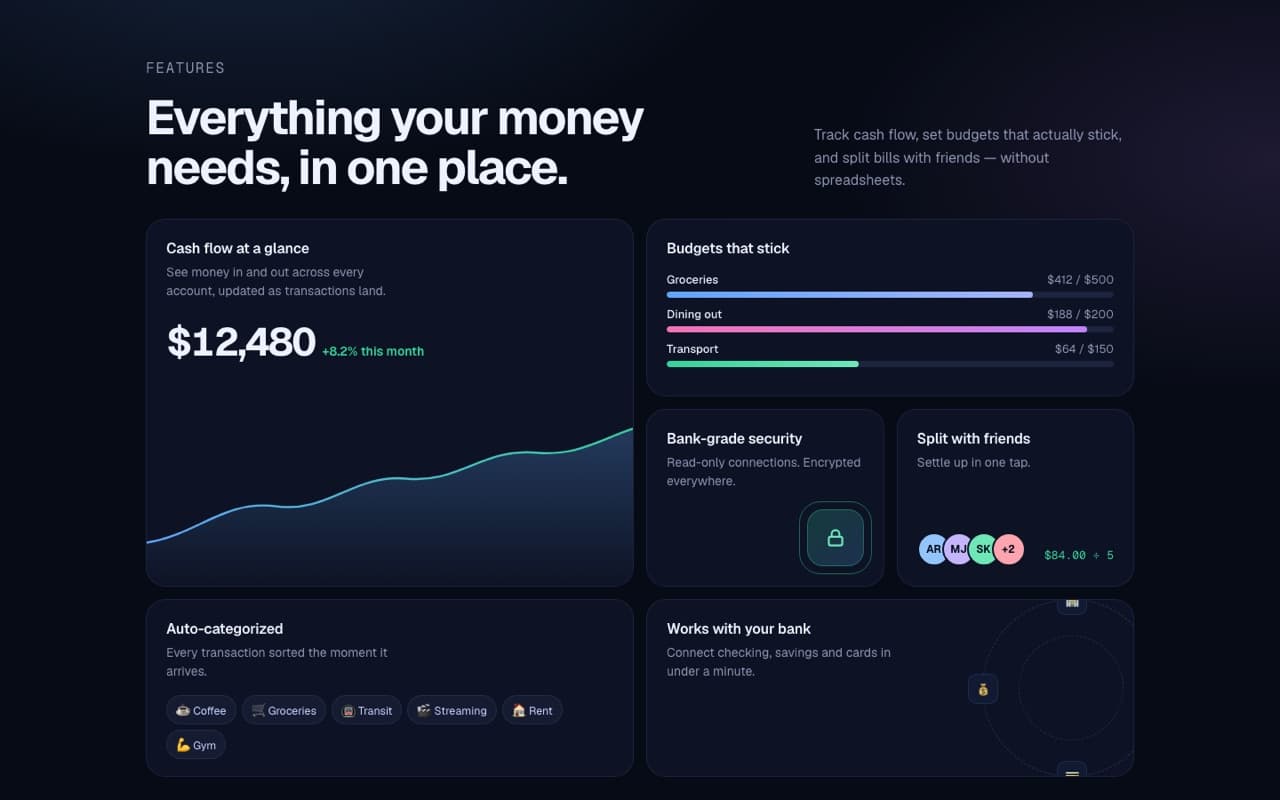
Live — built from this exact promptOpen live demo
prompt.md
Course onlyBuild a single, self-contained index.html: a "bento grid" features section for a product, with small live visuals inside the tiles. Product: [NAME, e.g. "Ledgerly"] — [WHAT IT HELPS PEOPLE DO] 6 features (title + one short sentence each): [FEATURE 1] … [FEATURE 6] Colors: a dark navy background with [3 ACCENTS, e.g. blue #60a5fa, green #34d399, purple #c084fc] Technical rules - One file, inline CSS and JS, Google Fonts (Geist + Geist Mono). No libraries, no images — visuals are SVG, CSS and HTML. Layout
The full prompt comes with the course
All 55 prompts in the library are part of the Vibewrights course. Enrollment opens in January 2027 — join the waitlist to get the founding-member price.
See what's includedWhat you'll get
- ✓A 4-column bento grid that adapts to mobile
- ✓An SVG chart that draws itself and a count-up metric
- ✓A cursor spotlight inside every tile
- ✓Clearly fictional sample data, no real logos
How to use it
- 1Replace everything in [BRACKETS] with your own product and colors.
- 2Paste it into Lovable, Bolt or Claude Code and open the result in your browser.
- 3Compare it with the live demo, then ask for one change at a time.
— From the course
You'll build this end-to-end in Module 2, with a step-by-step video walkthrough and AI feedback on your project.